crossgeared.com

Posts Tagged ‘MacBook’

Review: MacBook

Tuesday, August 12th, 2008

Intro:
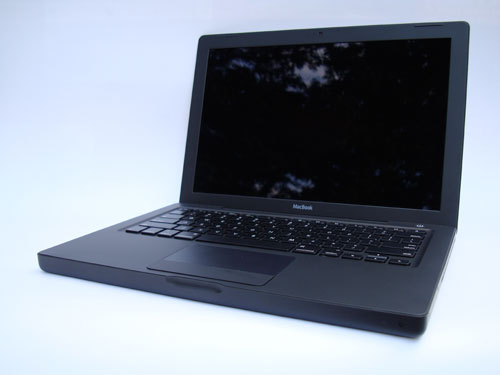
This isn’t so much a review as it is a comparison between the MacBook and two other similar Apple portables: the MacBook Air and the 12″ PowerBook. Why? In my opinion (and many others) the 12″ PowerBook is one of the best portables Apple (or anyone else) has ever made. The 12″ PowerBook is small, light, durable, and a great overall package. There was a significant and glaring gap in Apple’s portable line after the discontinuation of the 12″ PowerBook. The MacBook and the MacBook Air are currently Apple’s smallest portables. I gave my opinion of the MacBook Air recently, and now it is time for the MacBook.

Pros:

  • Good value
  • Fast processor
  • Large hard drive
  • FireWire 400 port
  • Nice size
  • Well built and durable
  • Easily accessible RAM and hard drive

Cons:

  • LCD not LED back lit
  • Keyboard not back lit
  • Poor prices on RAM upgrades through Apple (no surprise)
  • No option for ‘No RAM’ or anything less than 2GB
  • Integrated video is adequate, but not impressive
  • Small trackpad

Compared to MacBook Air:
While the MacBook’s profile is significantly larger than the Air, it is still relatively compact.  The MacBook has a faster processor, faster hard drive and more RAM.  That said, it doesn’t really feel any quicker than the MacBook Air; both are adequate.

Other than that, the trackpad is functional but on the small side, the absence of a back lit keyboard is annoying, and the battery life seems to be pretty good.  Speaking of batteries, the non-(easily)removable battery on the MacBook Air gets a lot of press, but I don’t care.  The MacBook has an easily removable batery, but I don’t see this as much of an advantage.  The only time I’ve removed the batteries from my other laptops was when they needed to be replaced, which is generally about once every 2-3 years.


Compared to 12″ PowerBook:
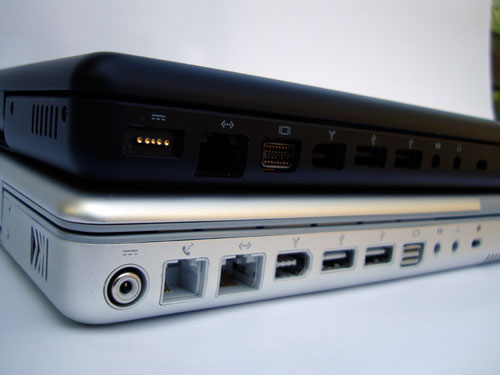
In comparison the the 4.6 lb. 12″ PowerBook, the 4.9 lb. MacBook is both larger and heavier. However, the MacBook gains a much lager display with that 0.3 lb. increase.  Aside from the obvious advantages of a larger screen and modern multi-core processor, the MacBook benefits from a better keyboard, the nifty Magsafe power connector, and a magnetic latch. One area that the MacBook really has an advantage is the hard drive.  Okay, not specifically the hard drive, but the ease of removal/installation of said hard drive.  The last 12″ PowerBook I took apart required the removal of somewhere on the order of 30 screws to get to the hard drive.  The MacBook hard drive is easily removed via a door in the battery compartment: ifixit procedure.


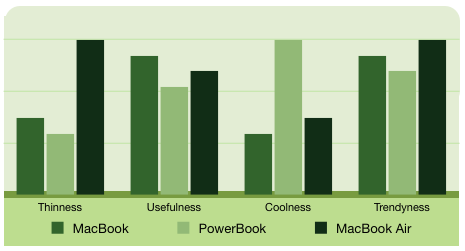
Conclusion:  While not as thin and cool as the MacBook Air, the MacBook betters it in terms of value and flexibility.  The MacBook didn’t stand a chance against the ‘coolness’ of the PowerBook or the ‘thinness’ of the MacBook Air.  But as you can see, the MacBook compares favorably to the PowerBook and MacBook Air in the key metric of ‘usefulness’ and is competitive in terms of ‘trendyness’.
Why did I buy a MacBook weeks prior to a likely product line update?  Reliability.

The 15″ aluminum PowerBook that this MacBook is replacing was a disaster.  It was purchased the day the new PowerBooks were released and started off with white spots on the screen, lost the keyboard back light and went through a total of four logic boards.  Oh, and it wasn’t even the first one we bought; the first one was returned becuase the latch wouldn’t close. Compare that to my 1.33 GHz 12″ PowerBook which was purchased near the end of the product cycle.  It has had zero hardware issues and has held up very well.  On the other hand, the MacBook Air, Mac Mini PPC 1.42, Mac Mini 1.6 Core 2 Duo,  15 GB iPod 3G and 16 GB iPod Touch were all purchased very early in their product cycles (first day available in many cases) and have performed flawlessly. Whatever the case, I wanted this MacBook to be reliable and didn’t want to take a chance on the successor.
Lenovo ThinkPad X300

Tuesday, May 13th, 2008

X300

A Brief Lenovo X300 Review from a MacBook Air User:

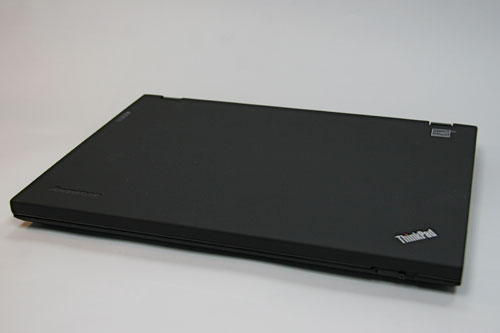
First impressions:  Nice materials, very light, but thicker and bulkier than I expected.  The overall appearance of the X300 is scarcely different than my old ThinkPad 600e, which was a great looking laptop (in 1998). Industrial engineering must not be Lenovo’s strong suit…  Opening the X300 is another story: the latch is cheap and does not make a good impression for the first interaction.  The MacBook Air wins hands down in first impressions.  The Apple looks and feels nicer than the X300 in every aspect.   


X300 Display 


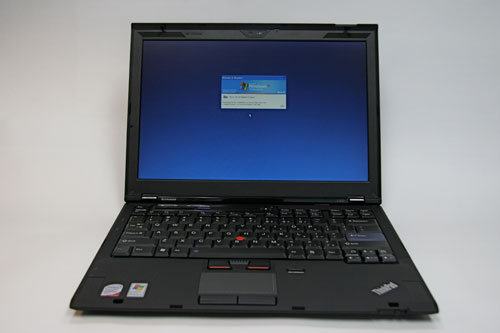
User Interface: The X300 Trackpad is too small and feels very cramped.  The keyboard is acceptable, but not as nice as the MacBook Air.  The TrackPoint is an odd throwback and should be axed from future ThinkPads.  Overall, I am very disappointed with the X300 keyboard, it is a big step backwards from the IBM ThinkPad keyboards.  The MacBook Air wins with superior keyboard and sprawling trackpad.

Display: The LCD is acceptable, but not very bright and poorly packaged (which is quite surprising considering that it is LED backlit).  The border around the display has an oddly large and out of place lip, and the protruding latch hooks look pretty bad on a $3000+ laptop.  Also, the glossy screen on the MacBook Air convinced me that glossy is the way to go, and the X300’s matte screen reinforces my opinion.  The X300’s LCD is nice, but it should be better: the MacBook Air wins.

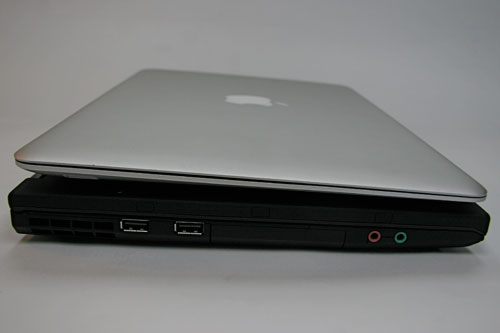
X300 and MacBook Air from the side

Ports and Other Inputs: Some of the ports and switches on the X300 are in odd and unexpected locations.  The WiFi enable/disable switch is on the back on the laptop, next to an errant third USB port (the remaining two USB ports are logically placed on the right side and are greatly appreciated).  The power, video out (HD15) and ethernet ports are all located on the back as well.  I’m not a fan of having ports on the back of a laptop, it is just inconvenient and (in my opinion) should be avoided.  The fingerprint reader is in an oddly prominent location.  Why is it located directly adjacent to the track pad?  Couldn’t it be moved somewhere out of the way and yet be more convenient?  I think one of the top corners next to the keyboard would work.  While the ports on the X300 are sometimes in confusing locations, they are present.  This is more than can be said for the MacBook Air.  The X300 wins by a mile.

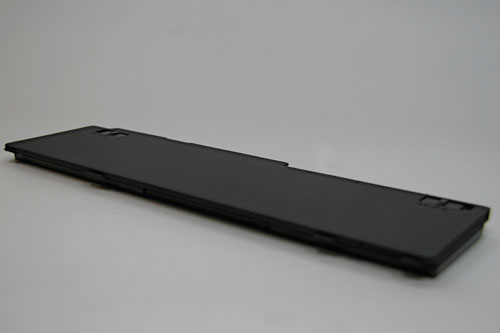
X300 Battery

Battery Life:  The battery life of the X300 is impressive.  The flexibility of a three or six-cell main battery plus an optional three-cell in place of the optical drive gives the X300 a published (but not tested) maximum of 4.3 to 10 hour run time.  The solid state drive (SSD) on the X300 helps improve battery life as well.  The MacBook Air doesn’t come close in maximum battery life or flexibility.  No contest here, the winner is the X300.

Processor:  The X300 ships with an Intel Core 2 Duo 1.2 GHz CPU.  The MacBook Air ships with a similar Core 2 Duo, but clocked at 1.6 GHz or 1.8 GHz.  I suppose the Apple wins this comparison, but I doubt anyone could tell the difference between these processors when performing common tasks on these systems.  Clock speeds just aren’t relevant these days, and the marginally slower chip in the X300 is not a significant disadvantage.  I’m pretty indifferent on this point, so both win, or lose.

Internal Storage:  The X300 can only be spec’d with a 64 GB SSD.  The MacBook Air comes standard with an 80 GB hard disk drive (HDD), and a 64 GB SSD is available for a paltry $1000 (ouch).  The MacBook Air comes out on top for offering a low-cost traditional hard drive as well as an SSD for those with deep pockets.

Optical Drive:  The X300 can be spec’d with a DVD-RW; the MacBook Air cannot.  This may be important to some, but I don’t have much use for an internal laptop drive.  An external drive is sufficient for the infrequent times I need to read/write a CD or DVD.  The X300 wins for offering an internal drive to those who need one.

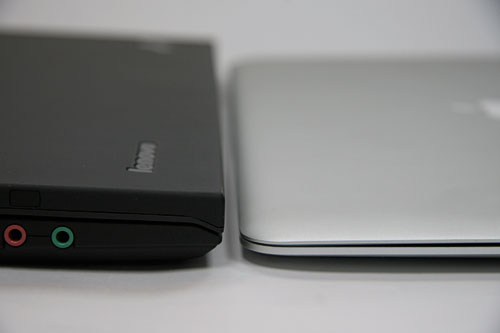
X300 and MacBook Air

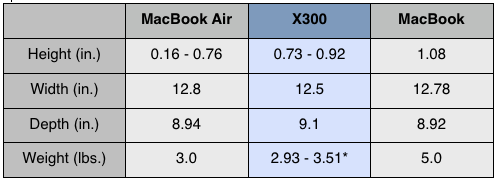
Size:  The X300 is thicker and bulkier than the MBA.  The 2.93-3.51 lb. weight and dimensions do not communicate the clunky feel.  This is not an ultra-portable laptop, it is a slightly thin and lightweight standard notebook.  The X300 feels more similar to a MacBook than a MacBook Air in size, but not in weight.  The X300 shares a striking similarity to the box the MacBook Air came in, and is a tank compared to the sleek MacBook Air.


MacBook, MacBook Air, and X300 Dimensions

*- The model I’m evaluating weighs 3.32 lbs.

Operating System:  The X300 offers Vista or XP pre-installed.  The MacBook Air is only available with OS X, but supports both XP and Vista.  The merits of each OS are debatable, but the important point is that XP can be ordered with X300.  Is it a little strange that the X300 comes with a “Designed for Microsoft Windows XP” sticker more than a year after the introduction of Vista?  Dell and Lenovo don’t think so. (http://arstechnica.com/news.ars/post/20080428-dell-lenovo-to-offer-windows-xp-beyond-june-30-cutoff.html)

Miscellany: The X300 has too many LEDs on the keyboard.  As I type this, six LEDs are on and two are flashing.  Is a power LED really necessary? Do I really need a red LED telling me that I have the sound muted?  Do I care if the SSD is being accessed?  The answer to all of these questions is “no”, and this all strikes me as very HP-like (this is not a compliment).  

Lenovo pre-installs way too much crapware.  I spend about an hour removing applications, cleaning up the menus and deleting installers.  And, why does a brand-new system need 81 updates from Microsoft?  All of these little issues are annoying and in comparison make the MacBook Air seem all the nicer.  

Price:  The X300 starts at $3225 (discounted: $2899) with a SSD.  The MacBook Air starts at $1799 ($1691) with a traditional HDD and $2798 ($2546) with an SSD.  The MacBook Air is a bargain compared to the Lenovo.  Having used both systems, it is difficult to see where the extra money is going in the X300; the MacBook Air looks and feels much more expensive than the Lenovo.  Winner: MacBook Air.

Conclusions:  The X300 is a good laptop, but it isn’t great.  It is a decent notebook, but look elsewhere for an ultra portable.  Those who are expecting IBM Thinkpad quality and feel will be disappointed, but those who are looking for an alternative to the MacBook Air or who require extended battery life may be satisfied.  Either way you go, you’ll have a substantially thinner wallet.

MacBook Air vs 12″ PowerBook

Saturday, February 9th, 2008

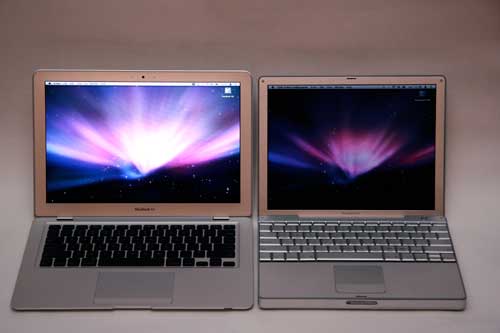
MacBook Air & PowerBook

I’m not going to talk about the lack of an optical drive, ports, or the battery that is accessible only to the elite few who know how to use a screwdriver. We’re all aware of what the MacBook Air has and does not have. Instead, I’ll compare this to Apple’s last sub-notebook, the 12″ PowerBook.

Compared to the 12″ PowerBook, the MacBook Air is dramatically thinner and about 50% lighter, but the footprint is a significantly larger. I suppose the 13″ display size is nice, but I would gladly take a smaller display for a decreased footprint. However, I’m not going to discount the quality of the LED backlit display. As you can see in the above photo the screen on the PowerBook is terrible compared to the MacBook Air. Both screens were at full brightness in the above photo. The glossy screen is among the best LCDs I’ve seen, and it has convinced me that glossy screens are the way to go.

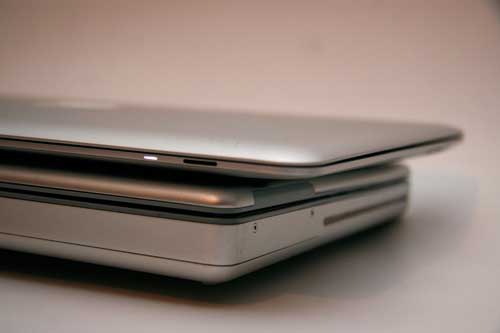
MacBook Air and PowerBook Profile

Okay, so it is a thin computer. So what. Well, it is kind of nice actually. The 12″ PowerBook seems rather brick-like compared to the MacBook Air. The 12″ PowerBook was never really a light weight, and this flaw is quite obvious when compared to the MacBook Air. Also, the lower position of the MacBook Air keyboard relative to the table top makes typing more comfortable. The keyboard on the MacBook Air and the 12″ PowerBook are both very nice, but the MacBook Air beats the PowerBook in this category.

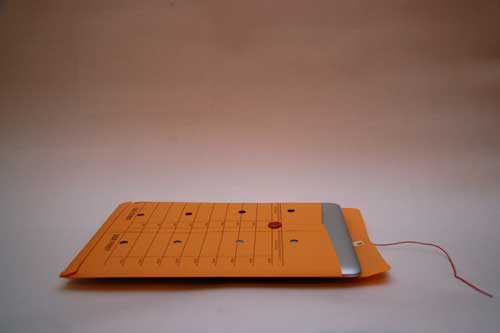
Finally, who saw the Macworld Expo keynote? Well, the MacBook air supposedly fits inside an inter-office envelope. I happen to have a standard 10″ x 13″ interoffice envelope and here is the result:

MacBook Air Interoffice Envelope

MacBook Air interoffice envelope

That would be a big fail. The envelope would make for a great carrying case, but it looks like you will have to order a special Apple Inc. interoffice folder if you want to be like Steve.

Were you expecting a conclusion? Oh. Well, the MacBook Air is nice. It isn’t a good primary computer, but it would make for an excellent second or third system. In contrast, the 12″ PowerBook was and still is a great primary computer, as long as you also use an external display. Most importantly, the MacBook Air looks pretty, it is easy to carry around, but it does not fit in an interoffice envelope. In retrospect, I suppose I really should have compared it to the iPod touch, which fits in much smaller envelopes.

iPod touch

Creative Commons License
www.crossgeared.com is licensed under a Creative Commons Attribution-Noncommercial-Share Alike 3.0 Unported License