• Road Trip

    ,

    Map MPG CO to UT

    Subaru MPG MD to UT

    As you can see, I took the Subaru from Maryland to Utah: 4,559 miles and 157.556 gallons of gasoline.

    Subaru

    What else? Well, the Subaru averaged 28.94 MPG with the best average mileage of 33.05 MPG on a tank from Glenwood Springs, CO to Castle Rock, CO. The worst mileage, which was still better than the average mileage to date, was in the Denver metro area that was driven entirely with two bikes on the roof. This partial tank averaged 25.45 MPG. Overall, the Subaru’s lifetime average fuel economy increased from 22.9 MPG to 24.4 MPG. The longest day of driving was the first day from Maryland to Missouri, and which covered just over 1000 miles.

    Stuff in Subaru

    Tires in Subaru

    During the trip the load ranged from two to four bikes, luggage/camping gear for one to two people and one to three actual people. The bikes were inside the car for the most part, but occasionally were mounted on the roof. Average speeds stayed within about 5% of posted speed limits, which are 75 MPH in Colorado and Utah.

    Subaru Arches

    Subaru

    Bikes in Friuta

    Slickrock

    Bikes in Moab

    Riding in Moab

    Aside from driving, we also rode the Kokopelli trail in Fruita, CO, Slickrock in Moab, UT, and the Apex trail near Denver, CO.

    Kent Eriksen Shop

    The Erkisen made it back to the Kent Eriksen shop where it received a professional tune-up, new cassette, chain and handlebar. The cassette was more worn than I thought, and the Wippermann chain was causing (or at least contributing to) chain suck. The Titec handlebar died at Moab where a strategic fall ripped one of the end plugs out of the bar with some of the titanium…


  • Titanium & Blue Aluminum

    Kent Eriksen Titanium Hardtail

    I finished building my new Kent Eriksen titanium hardtail XC bike this week. I’ve been working on this bike for almost three months, and it was well worth the effort.

    UK-14′er

    The frame was made by Kent Eriksen in Steamboat Springs, CO. Kent did a great job (as expected), and was very helpful in the design and planning stages. The frame construction, welding and overall design are the best I’ve seen. The attention to detail is also impressive (check out the screw head orientation on the headbadge). The headbadge was designed by Eric and made by Jen Green in Philadelphia, PA. Jen kept to Eric’s design and the badge turned out beautifully. Most of the remainder of the components came from Karl at Klunk Cycles in Columbia, MO, and a handful of parts came from local DC-area bike shops.

    Building the Eriksen

    The components on the Eriksen tend toward the durable side, as opposed to light weight. The fork is a 100 mm Rock Shox Reba Race w/ lockout, and the drivetrain is mostly Shimano Deore XT with a SRAM cassette and a Wippermann chain. The brakes are from Paul’s Component Engineering, and the wheels are Mavic ceramic Crossmax ST/XLs. Other interseting components include Salsa titanium skewers, Thomson stem, Titec bars, Selle Italia saddle and a very nice Kent Eriksen “Sweetpost” titanium seatpost. The total weight of the bike (w/o pedals) is 23.25 lbs.

    Eriksen Welds

    I’ve only ridden the Erkisen once. It has been very wet and muddy here. However, I’m planning a biking trip in Colorado and Utah soon, and I’ll have some riding impressions and more photos…


  • Lenovo ThinkPad X300

    X300

    A Brief Lenovo X300 Review from a MacBook Air User:

    First impressions:  Nice materials, very light, but thicker and bulkier than I expected.  The overall appearance of the X300 is scarcely different than my old ThinkPad 600e, which was a great looking laptop (in 1998). Industrial engineering must not be Lenovo’s strong suit…  Opening the X300 is another story: the latch is cheap and does not make a good impression for the first interaction.  The MacBook Air wins hands down in first impressions.  The Apple looks and feels nicer than the X300 in every aspect.   


    X300 Display 


    User Interface: The X300 Trackpad is too small and feels very cramped.  The keyboard is acceptable, but not as nice as the MacBook Air.  The TrackPoint is an odd throwback and should be axed from future ThinkPads.  Overall, I am very disappointed with the X300 keyboard, it is a big step backwards from the IBM ThinkPad keyboards.  The MacBook Air wins with superior keyboard and sprawling trackpad.

    Display: The LCD is acceptable, but not very bright and poorly packaged (which is quite surprising considering that it is LED backlit).  The border around the display has an oddly large and out of place lip, and the protruding latch hooks look pretty bad on a $3000+ laptop.  Also, the glossy screen on the MacBook Air convinced me that glossy is the way to go, and the X300’s matte screen reinforces my opinion.  The X300’s LCD is nice, but it should be better: the MacBook Air wins.

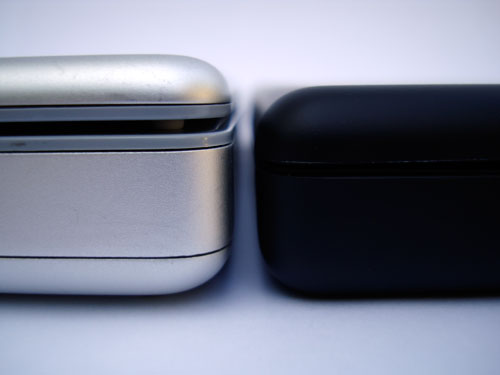
    X300 and MacBook Air from the side

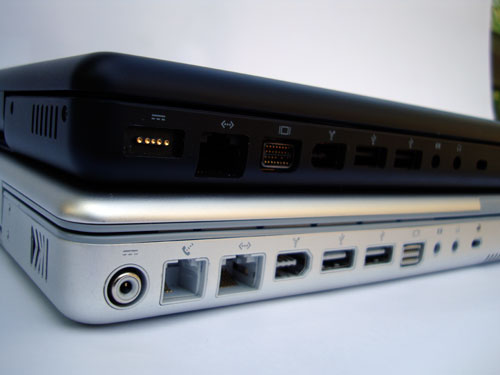
    Ports and Other Inputs: Some of the ports and switches on the X300 are in odd and unexpected locations.  The WiFi enable/disable switch is on the back on the laptop, next to an errant third USB port (the remaining two USB ports are logically placed on the right side and are greatly appreciated).  The power, video out (HD15) and ethernet ports are all located on the back as well.  I’m not a fan of having ports on the back of a laptop, it is just inconvenient and (in my opinion) should be avoided.  The fingerprint reader is in an oddly prominent location.  Why is it located directly adjacent to the track pad?  Couldn’t it be moved somewhere out of the way and yet be more convenient?  I think one of the top corners next to the keyboard would work.  While the ports on the X300 are sometimes in confusing locations, they are present.  This is more than can be said for the MacBook Air.  The X300 wins by a mile.

    X300 Battery

    Battery Life:  The battery life of the X300 is impressive.  The flexibility of a three or six-cell main battery plus an optional three-cell in place of the optical drive gives the X300 a published (but not tested) maximum of 4.3 to 10 hour run time.  The solid state drive (SSD) on the X300 helps improve battery life as well.  The MacBook Air doesn’t come close in maximum battery life or flexibility.  No contest here, the winner is the X300.

    Processor:  The X300 ships with an Intel Core 2 Duo 1.2 GHz CPU.  The MacBook Air ships with a similar Core 2 Duo, but clocked at 1.6 GHz or 1.8 GHz.  I suppose the Apple wins this comparison, but I doubt anyone could tell the difference between these processors when performing common tasks on these systems.  Clock speeds just aren’t relevant these days, and the marginally slower chip in the X300 is not a significant disadvantage.  I’m pretty indifferent on this point, so both win, or lose.

    Internal Storage:  The X300 can only be spec’d with a 64 GB SSD.  The MacBook Air comes standard with an 80 GB hard disk drive (HDD), and a 64 GB SSD is available for a paltry $1000 (ouch).  The MacBook Air comes out on top for offering a low-cost traditional hard drive as well as an SSD for those with deep pockets.

    Optical Drive:  The X300 can be spec’d with a DVD-RW; the MacBook Air cannot.  This may be important to some, but I don’t have much use for an internal laptop drive.  An external drive is sufficient for the infrequent times I need to read/write a CD or DVD.  The X300 wins for offering an internal drive to those who need one.

    X300 and MacBook Air

    Size:  The X300 is thicker and bulkier than the MBA.  The 2.93-3.51 lb. weight and dimensions do not communicate the clunky feel.  This is not an ultra-portable laptop, it is a slightly thin and lightweight standard notebook.  The X300 feels more similar to a MacBook than a MacBook Air in size, but not in weight.  The X300 shares a striking similarity to the box the MacBook Air came in, and is a tank compared to the sleek MacBook Air.


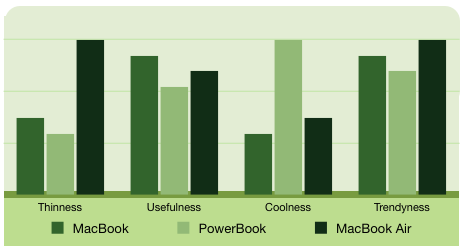
    MacBook, MacBook Air, and X300 Dimensions

    *- The model I’m evaluating weighs 3.32 lbs.

    Operating System:  The X300 offers Vista or XP pre-installed.  The MacBook Air is only available with OS X, but supports both XP and Vista.  The merits of each OS are debatable, but the important point is that XP can be ordered with X300.  Is it a little strange that the X300 comes with a “Designed for Microsoft Windows XP” sticker more than a year after the introduction of Vista?  Dell and Lenovo don’t think so. (http://arstechnica.com/news.ars/post/20080428-dell-lenovo-to-offer-windows-xp-beyond-june-30-cutoff.html)

    Miscellany: The X300 has too many LEDs on the keyboard.  As I type this, six LEDs are on and two are flashing.  Is a power LED really necessary? Do I really need a red LED telling me that I have the sound muted?  Do I care if the SSD is being accessed?  The answer to all of these questions is “no”, and this all strikes me as very HP-like (this is not a compliment).  

    Lenovo pre-installs way too much crapware.  I spend about an hour removing applications, cleaning up the menus and deleting installers.  And, why does a brand-new system need 81 updates from Microsoft?  All of these little issues are annoying and in comparison make the MacBook Air seem all the nicer.  

    Price:  The X300 starts at $3225 (discounted: $2899) with a SSD.  The MacBook Air starts at $1799 ($1691) with a traditional HDD and $2798 ($2546) with an SSD.  The MacBook Air is a bargain compared to the Lenovo.  Having used both systems, it is difficult to see where the extra money is going in the X300; the MacBook Air looks and feels much more expensive than the Lenovo.  Winner: MacBook Air.

    Conclusions:  The X300 is a good laptop, but it isn’t great.  It is a decent notebook, but look elsewhere for an ultra portable.  Those who are expecting IBM Thinkpad quality and feel will be disappointed, but those who are looking for an alternative to the MacBook Air or who require extended battery life may be satisfied.  Either way you go, you’ll have a substantially thinner wallet.